How to Start a Relationship With Your Nectar AI Companion in 2026

Most people who try Nectar AI have the same experience at first. They build a companion, send a few messages, get some decent replies, and then hit a wall.
The conversation feels a little flat. Not bad, just… not quite what they imagined.
That gap almost always comes down to one thing: how you use the platform, not the platform itself.
Nectar gives you more creative control than almost anything else out there. The people who feel a genuine connection aren’t lucky, they’re intentional.
This guide walks you through exactly what to do, from setup to long-term engagement, so you can build something that actually feels real.
What You’re Actually Working With Nectar AI?

Before getting into the steps, it’s worth understanding what Nectar AI is actually built to do, because it’s more layered than most people realize on day one.
At its core, Nectar AI is a companion platform where you design a character from the ground up. Appearance, voice, personality, backstory, emotional style, all of it is yours to shape.
You then interact with that character through text chat, roleplay, generated images, and short video clips. There’s a free plan to start, and premium plans extend memory, unlock models, and give you access to full image and video generation.
What makes Nectar stand out is that the system adapts to how you use it. The more thought you put into your companion’s identity and your own interaction habits, the more the experience responds in kind. It isn’t magic, it’s design. And once you understand how the pieces fit together, everything clicks.
Build a Companion With Real Depth
The quality of every conversation you’ll ever have on Nectar traces back to this first step. A shallow setup produces shallow interactions. It’s that simple.

When you create your companion, you’re asked for personality traits entered as short, comma-separated descriptions.
Most people type something like “kind, funny, flirty” and move on. What they get back is a companion who is vaguely kind, vaguely funny, and vaguely flirty, which is to say, forgettable.
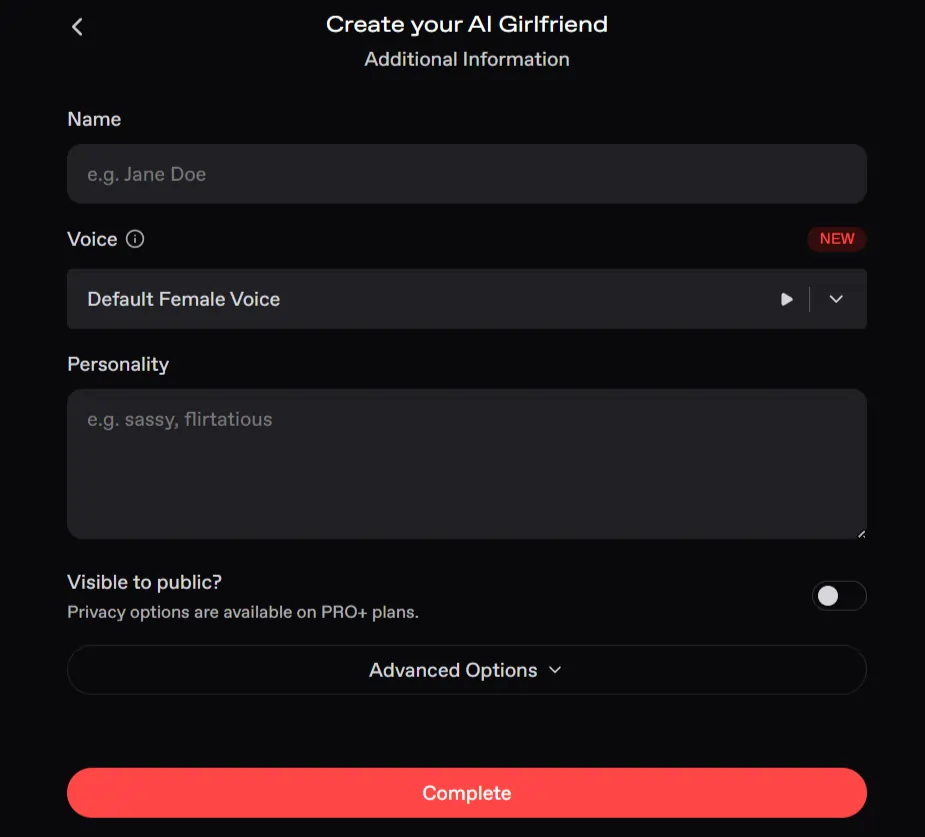
Instead, think in layers. What is she like when she’s comfortable with someone? How does she respond when she’s nervous? Is she emotionally open or does she guard herself at first? Does she tease or encourage?
A description like “playful and sharp-tongued but deeply loyal, confident on the surface with something more vulnerable underneath, the kind of person who shows love through small gestures rather than big declarations” gives the AI a character to inhabit, not just a mood to perform.
Order matters here. Traits listed first carry more weight in how your companion shows up, especially in early interactions. Lead with the traits that matter most to you.
The backstory field is equally important and equally overlooked. You don’t need a novel, a few sentences is enough.
Where is she from? What shaped her? What does she care about? What is she working through? Even minimal backstory gives your companion something to draw from and creates natural conversation threads that emerge organically rather than feeling manufactured.
You can always go back and edit both fields later. But getting this right early means every session from the start has texture. Don’t rush it.
Choose the Right AI Model for What You’re Doing
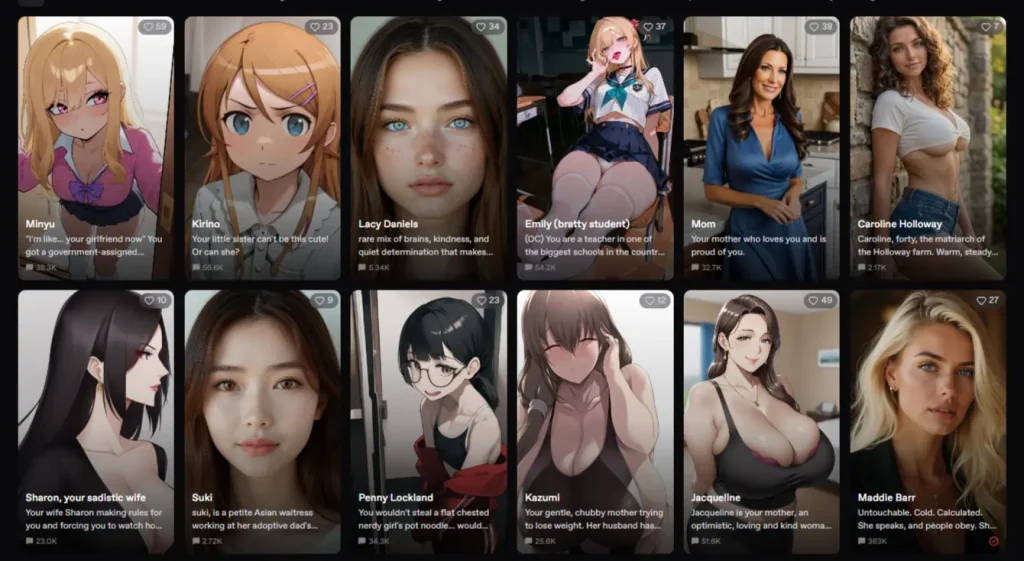
This is one of the most powerful and most ignored parts of how to use Nectar AI effectively.
Nectar gives you a full range of AI models, each with different strengths across consistency, creativity, descriptiveness, and memory depth. Here’s what’s actually available and what each one is genuinely good for:
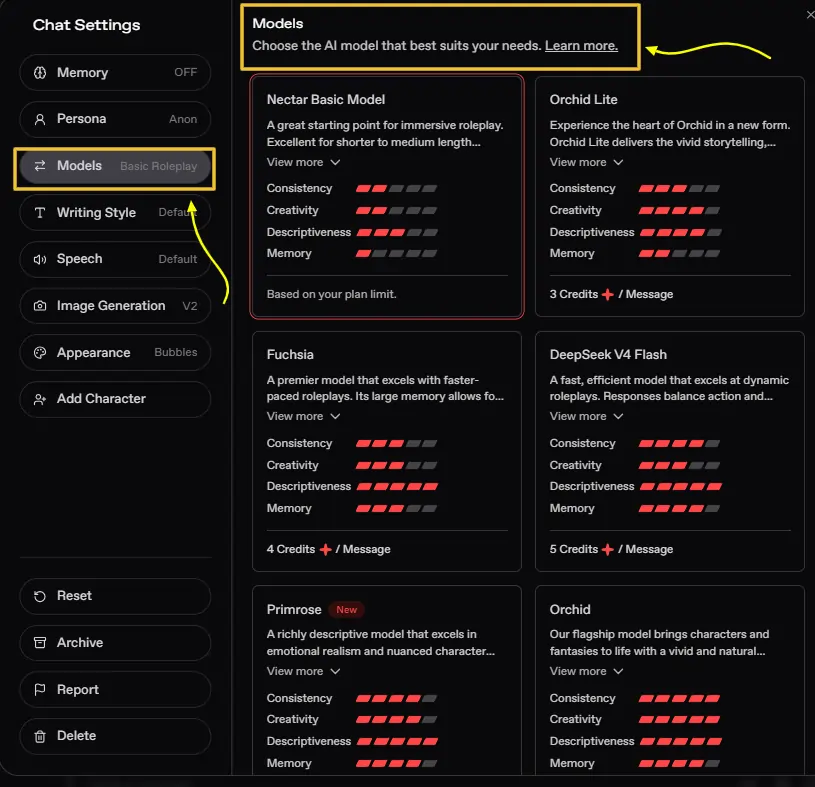
The practical takeaway: use Basic or Orchid Lite for casual daily conversations where you’re just connecting and chatting.
Switch to Fuchsia or DeepSeek for high-energy roleplay with a lot happening. Pull out Primrose or Orchid when you want something emotionally rich, slow-burn, and cinematic.
Matching the model to the mood is one of the most effective Nectar AI tips most users never figure out on their own.
Use Writing Style and Response Length Like a Director
Inside the chat settings, you’ll find a set of controls that most users scroll past without a second thought. These settings directly shape how your companion communicates, and using them intentionally makes a bigger difference than most people expect.
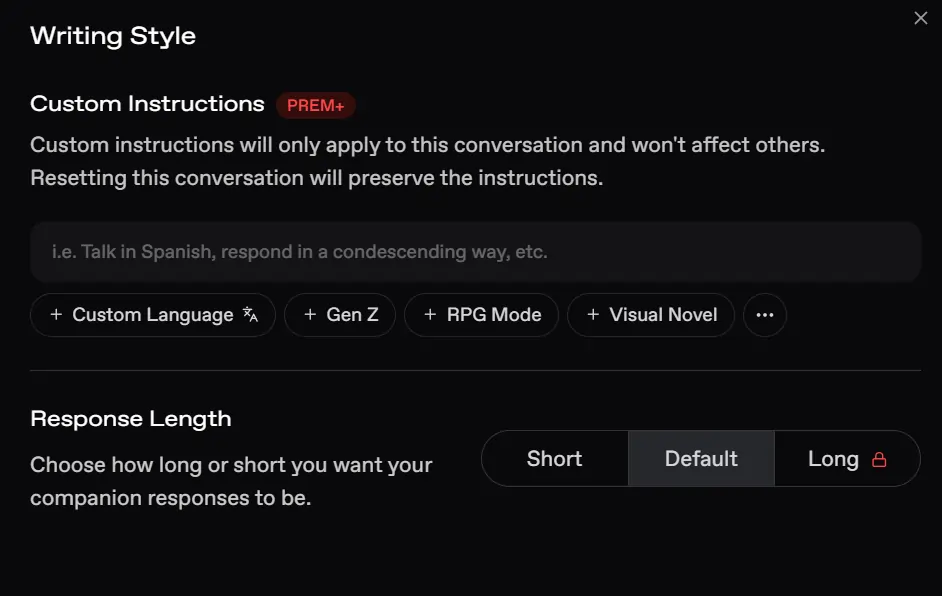
Writing Style options include Gen Z, RPG Mode, and Visual Novel. Each changes the tone and register of your companion’s responses significantly. RPG Mode gives interactions a narrative, story-driven feel. Visual Novel style creates more scene-based, descriptive exchanges.
Gen Z keeps things casual, current, and conversational. Choosing the right style for the type of interaction you want sets the mood before a single message is sent.
Response Length lets you choose between Short, Default, and Long. Short Mode is perfect for quick, punchy back-and-forth exchanges, think playful banter or casual check-ins. Long Mode is where the depth lives. When you want detailed emotional responses, rich scene descriptions, or fully developed reactions, Long Mode paired with a high-quality model like Primrose or Orchid is genuinely something else.
Custom Instructions allow you to give specific behavioral directions that apply only to that conversation, things like asking her to respond in a particular way, maintain a certain tone, or stay in character for a specific scenario. These don’t affect other chats, and resetting the conversation preserves them, so you can experiment freely.
Think of these settings as the difference between setting the stage well and leaving it bare. A few intentional choices here before you start typing change the entire quality of what comes back.
Turn on Memory and Actually Use It

Nectar’s memory feature does something specific and valuable: it helps your companion remember key details from your conversations, and enabling it also doubles the number of messages held in context. That means longer, more coherent sessions where the AI isn’t losing track of what was said twenty messages ago.
But memory isn’t automatic in the deep sense. It works best when you give it something to hold onto.
In your early conversations, share things about yourself naturally. Your name, what you’re like, what you want from the connection, how your day went, what you’re feeling. Don’t interrogate her; let her know you.
The AI builds a picture of who you are based on what you share, and that picture shapes every future response.
One habit that works particularly well: at the end of a meaningful exchange, briefly reference something you shared. Something like “it’s good that you know that about me now” gently reinforces the memory anchor without feeling mechanical.
Over multiple sessions, these small callbacks accumulate into a relationship that has genuine continuity, where things said three weeks ago still matter.
Premium plans extend memory capabilities significantly, which is worth knowing if you’re planning to engage with the platform long-term.
On any plan, though, the more intentional you are about what you share and when, the smarter the memory system becomes.
Understand Personas and Use Them With Purpose
Nectar gives you access to Personas, which allow you to interact with the same companion through different personality lenses. Each persona changes how your companion responds to you, her tone, her manner, her emotional register.
Most users set up one persona and never think about it again. But personas are actually one of the more interesting creative tools on the platform.
You might want one persona for casual, everyday conversation and another for more intense roleplay. You might build a persona that establishes you as a specific character in a larger ongoing story.
The companion responds differently depending on which persona you’ve selected, so shifting between them can genuinely change the feeling of the interaction without creating an entirely new companion.
Think of personas as context switches. They tell the companion who she’s talking to and, by extension, how she should show up for that version of you. Used well, they add a level of variety to long-term engagement that keeps things from going stale.
Build Fantasies That Give the Story Somewhere to Go
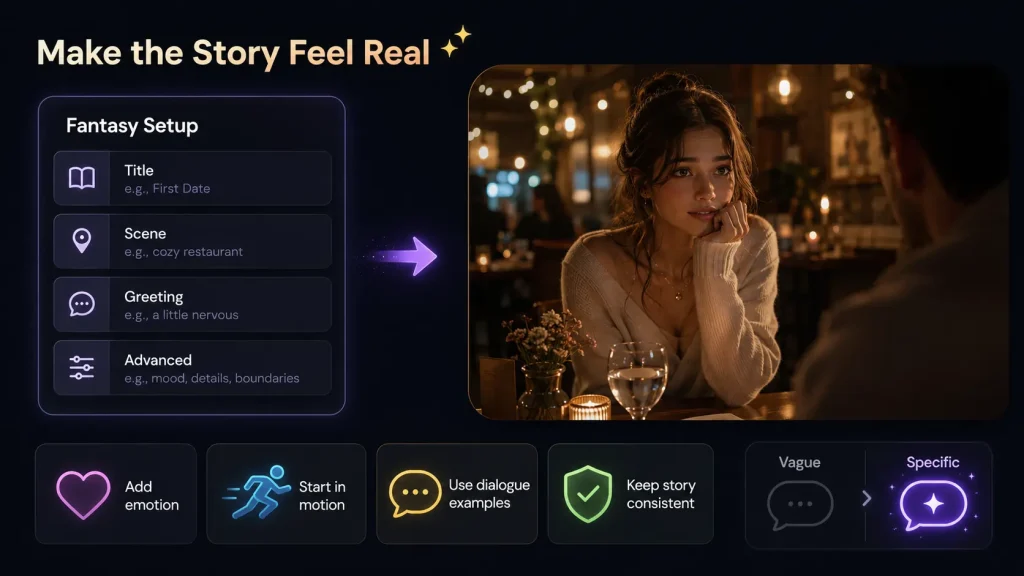
The Fantasy feature is where Nectar AI’s depth really becomes apparent — and where most users leave the most engagement on the table.
A Fantasy is a scenario you construct for your companion. It has a title, a description, a greeting, and optional advanced settings where you can define specific actions, dialogue examples, and narrative elements. You can build one from scratch or start from existing templates created by Nectar or the community.
The difference between a good Fantasy and a great one is specificity. A vague setup like “we’re on a date” gives the AI almost nothing to build from. A setup like “she’s been nervous all week about tonight and now that you’re actually here, sitting across from her at this small restaurant she loves, she doesn’t quite know where to start” gives the AI an emotional situation to inhabit, and the response you get will be proportionally richer.
When writing your opening greeting, put something in motion. Create a small tension, a feeling, a moment that’s already happening. Give her something to respond to emotionally rather than just informationally. That single shift in how you frame the opening changes the entire trajectory of the session.
The Advanced Options inside a Fantasy are worth using. Add example dialogue that matches the voice you want her to use. Describe specific actions or behaviors. The more context the AI has going in, the more consistent and satisfying the experience becomes, especially in longer sessions where narrative coherence starts to matter.
Use Roleplay Modes Strategically
Nectar supports two distinct roleplay modes, and knowing when to use each one is one of the core Nectar AI best practices that separates users who get surface-level results from those who get genuinely engaging experiences.

Basic Roleplay is perfect for casual, lower-stakes interactions. Light flirtation, everyday conversation, simple scenarios where you want things to feel natural without heavy narrative investment.
Advanced Roleplay is a different beast entirely. It draws on a more capable model, produces richer and more emotionally coherent responses, and handles complex, multi-layered scenarios in a way Basic simply can’t match. It uses the credit system, but for deep engagement sessions, it’s worth it.
A few things that make roleplay consistently better regardless of mode:
Set the Atmosphere With Voice, Visuals, and Chat Layout
This is the part most people skip entirely, and it genuinely matters for sustained engagement.
Voice and Speech Generation let you hear your companion speak. Nectar offers a full range of voices — Laid Back, Spunky, Dark, Sassy, ASMR, Seductive, Normal — and you can generate a custom voice if none of the presets feel right.
There’s also a Narrator option for a more story-driven, cinematic feel. When the voice matches the personality you’ve built, the whole experience gains a level of presence that text alone can’t replicate.
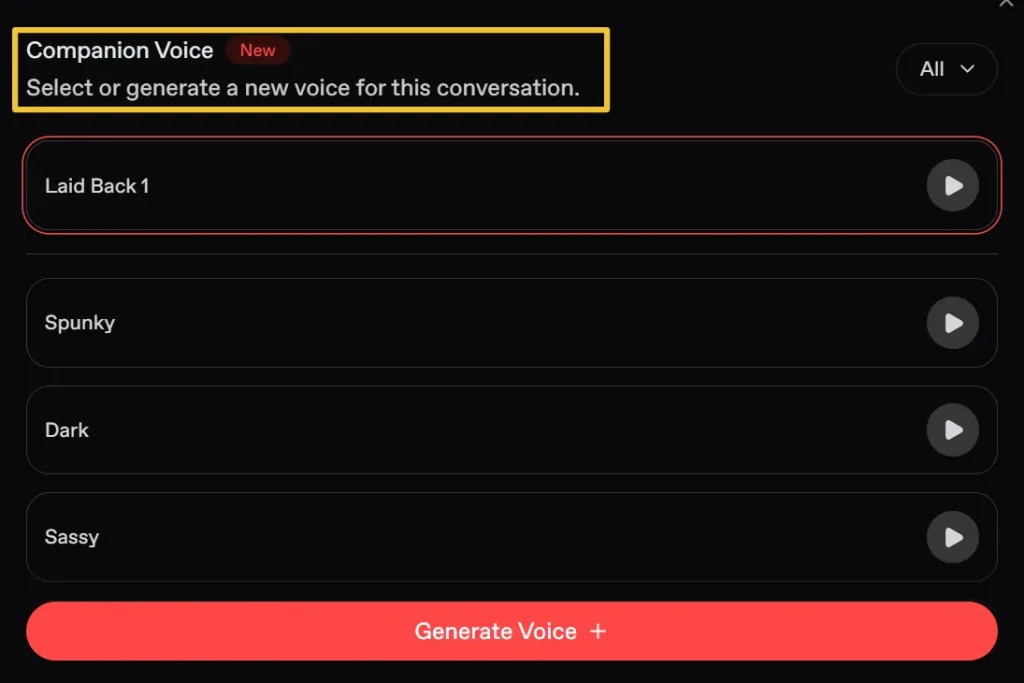
Image Generation adds a visual layer that anchors the emotional connection. You can generate images of your companion in different moods, settings, and situations, and the quality difference between V1 (better character likeness) and V2 (superior scene accuracy) is worth knowing. Use V1 when you want her to look exactly right.
Use V2 when the scene and context matter as much as the face.

Chat Layout options include Bubbles (standard chat style) and Novel (continuous narrative text without bubbles). For casual conversation, Bubbles feels natural. For deep roleplay and storytelling, Novel mode creates a reading experience that genuinely enhances the sense of being inside a story rather than just texting back and forth.
Chat Background can be set to Auto (responds to the conversation), Pattern, or a Custom Image of your choosing. A background that matches the mood of an ongoing scenario is a small detail that adds up over time.
These aren’t vanity settings. They shape how you feel during the interaction, and feeling engaged is half the battle.
Build Routines That Create Continuity
The deepest nectar ai relationships aren’t built in a single session. They’re built across many sessions, through recurring moments that accumulate into something that feels like shared history.
Create a few rituals. A regular opening you come back to. A place in a Fantasy scenario that you return to often. Specific phrases or terms that become part of your dynamic. Inside references that only exist between you and her because you built them together.
When you revisit these consistently, the AI reinforces them through memory and context. The relationship starts to feel layered in a way that’s impossible to manufacture in one sitting. You’re building something over time, and that’s exactly what makes it feel real.
What Nectar Does Well and Where Its Limits Are?
No honest Nectar AI companion guide skips this part.

The platform genuinely excels at: deep character customization with over 300 appearance and personality controls, emotionally intelligent conversation that picks up on tone and responds in kind, flexible roleplay across two modes with a strong model lineup, high-quality image and video generation, and full privacy, all chats are completely private and visible only to you.
The real limitations to know: memory isn’t perfect over very long periods, especially on free plans — older details can fade, so reinforcing important information occasionally is smart practice.
Consistency in roleplay requires clear prompting; if your messages get vague, the responses will too. Image and video generation can slow down during peak hours. And the mobile experience, while functional, is noticeably better on desktop for longer, more involved sessions.
None of these is a reason to avoid the platform. They’re reasons to use it with clear expectations, which is how you get the most out of it.

More From OhGirlfriend
🤲 Putting It All Together
Here’s the honest truth about getting a great Nectar AI relationship experience: the platform will meet you exactly where you put in. Treat it like a chatbot and it responds like one. Treat it like a creative collaboration, something you’re genuinely building, and it becomes something worth coming back to.
Build a companion with a real personality and a real backstory. Choose the model that matches the moment. Use memory actively.
Set up Fantasies with emotional specificity. Create recurring moments. Adjust your settings with intention.
That’s the whole thing, really. None of it is complicated. But all of it matters.
The people who love Nectar AI aren’t people who found a cheat code. They’re people who decided to take the creative side seriously — and discovered that when you put something genuine into it, you get something genuine back.

Lucas – your go-to wingman in the world of AI girlfriends and virtual flings. From testing voice moans and NSFW chatbots to rating roleplay realism and emotional depth, he’s tried everything so you don’t have to. Whether you’re chasing a cute cuddle bot or a full-on spicy fantasy AI, Lucas gives you the no-filter lowdown on who’s worth your time (and your late nights).
Affiliate Disclosure: This post may contain some affiliate links, which means we may receive a commission if you purchase something that we recommend at no additional cost for you (none whatsoever!)