How to Delete AI Girlfriend Chat History (and Account Data) in 2026
Quick Answer: Can You Delete AI Girlfriend Chat History?
Yes—you can delete AI girlfriend chats, but “delete” can mean three totally different things:
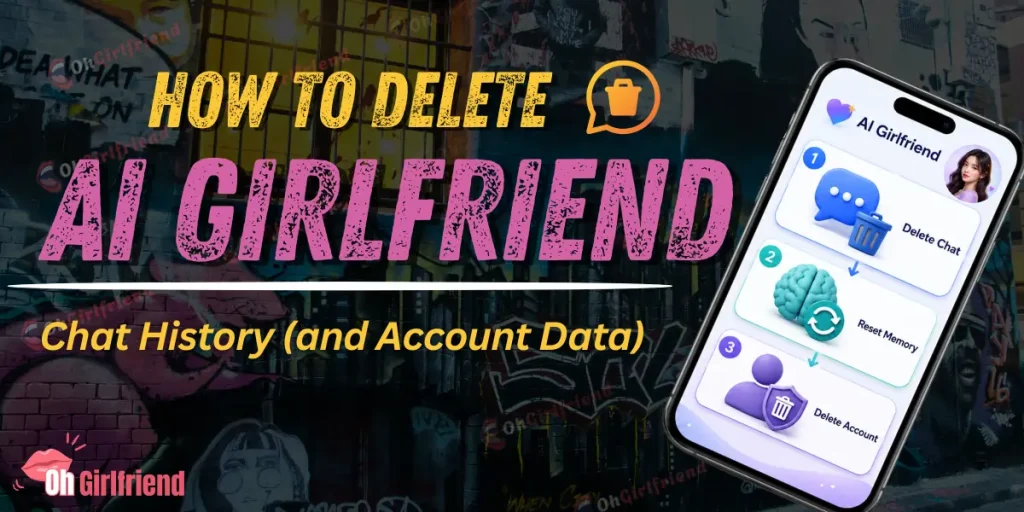
If you want the safest “clean slate” move, do this order: cancel billing first (so you don’t get charged while you’re cleaning up) → delete chats / reset memory in-app → request account deletion if the app supports it (or contact support).
And one spicy truth: uninstalling the app is not a deletion strategy. It’s just you walking away while your subscription keeps doing sit-ups in the background.
🤷♀️ Who This Guide Is For
You’re probably here because one of these is true:
I’m going to explain what “delete chat” actually does, how to do it without accidentally staying subscribed, and how to request account deletion without sounding like you’re emailing from a bunker.
🎯 First: Understand What You’re Trying to Delete
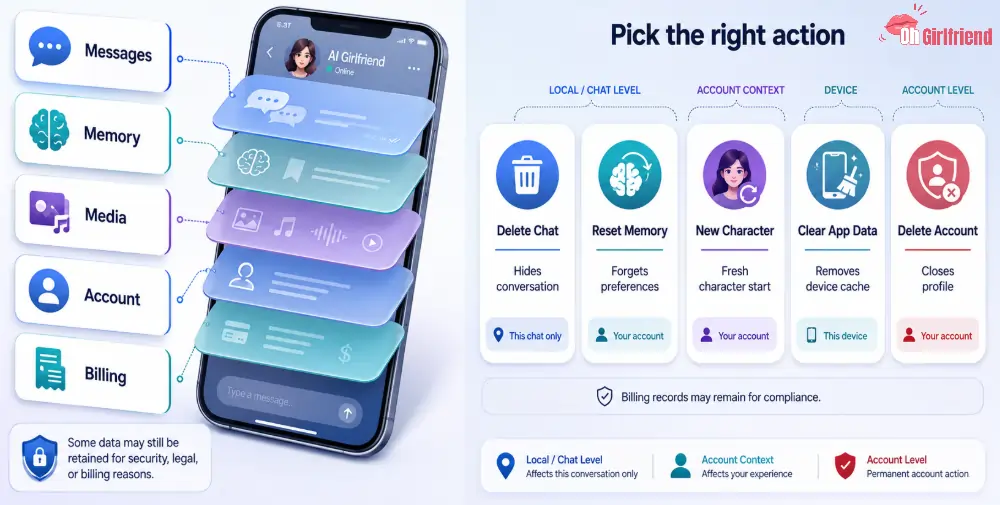
Most AI girlfriend apps have multiple layers of “stuff”:
Here’s the key: some apps let you delete your view of messages, while the company may still retain data for moderation, security, legal, or billing reasons. That’s why you need to pick the right “delete” action.
💬 Table 1: “Delete Chat” vs “Reset Memory” vs “Delete Account” (What Each One Usually Does)
| Action you take | What it usually removes | What it often does not remove | Best for |
|---|---|---|---|
| Clear / delete conversation | Chat thread from your app interface | Server-side logs, backups, analytics data | Quick cleanup, device privacy |
| Reset/clear memory | Stored “facts” the bot uses to remember you | Old chat logs, billing records | Stopping cringe callbacks, fixing weird personalization |
| Delete character / start new character | That character’s local history and settings | Company-wide account data | Fresh start without deleting your whole account |
| Log out + remove app data (device) | Cached files on your phone | Anything stored in the cloud | Shared device safety |
| Delete account / request data deletion | Account profile + (sometimes) chat/media | Billing/transaction records, legal retention items | “I want out” privacy + closing the loop |
👉🏻🗑️ Before You Delete Anything: Do This 5-Minute Safety Prep
This is the part people skip… and then regret.
Cancel billing first (so you don’t get charged while cleaning up)
Screenshot what matters (if you’re disputing charges)
If this is about unexpected billing, grab proof before you delete the account:
Deleting first can remove the evidence you need later.
Decide your goal: “clean slate” vs “full exit”
Be honest with yourself:
Change your password (if you used a reused password… please don’t lie)
If you used a password you’ve used anywhere else (email, socials, banking—don’t do that), change it now. “Delete account” is not instant everywhere, and you don’t want someone logging in during the in-between.
Clean your email trail (optional, but real-life useful)
If privacy is the main driver, remember that receipts and login emails can be more revealing than chat logs.
🤔 How to Delete AI Girlfriend Chat History (Three Common Paths)

Because every app UI is different, I’m going to give you the three paths that cover almost all tools.
Delete or clear a specific chat thread
This is the “I like the app, I just want that chat gone” path.
What to look for in menus:
If you see “clear chat” and “reset memory” as separate toggles, do both if you want a true clean slate experience.
Reset/clear memory (when the bot won’t stop being weird)
If your AI girlfriend keeps bringing up a thing you said once at 2 a.m. and you want to time-travel… memory reset is the closest thing we have.
Look for:
Real example (what this fixes):
If you once said “I love being called Captain” as a joke and now every message is “Hello Captain” like it’s legally required… memory reset usually solves that.
Delete account / request data deletion (the “full exit” move)
This is what you do when you want the company to stop storing your account entirely (as much as they can).
Where the option usually hides:
If there’s no delete button, you can still send a deletion request to support. Which brings us to the part people overcomplicate…
🗑️ The Clean Deletion Request (Copy/Paste Template That Actually Works)
You do not need to write a novel. You need to be clear, specific, and include identifiers they can use to find your account.
Table 2: What to include in a deletion request (and why)
| What to include | Why it matters | Example |
|---|---|---|
| Account email/username | Helps them locate your profile | “My account email is ___” |
| What you’re requesting | Prevents support ping-pong | “Please delete my account and associated chat data.” |
| Scope preference | Some companies can delete chats but keep billing logs | “Delete chats/media where possible; I understand billing records may be retained.” |
| Payment method context | Helps if there are multiple accounts | “Subscribed via website checkout” or “Apple subscription” |
| Date range (optional) | Helps search logs | “Account created around March 2026” |
| Confirmation request | Forces closure | “Please confirm once deletion is complete.” |
Example email (friendly, firm, not dramatic)
Subject: Account deletion request
Body:
Hi support team — please delete my account and associated chat history/media where possible.
Account email: [your email]Username (if applicable): [name]Subscription: cancelled (please confirm no further renewals)
If any data must be retained for billing/legal reasons, please delete everything else you can and confirm when the deletion request is completed.
Thank you.
📌 Important: Cancelling a Subscription Is Not the Same as Deleting Data
This is where people get tricked by their own optimism.
If you’re privacy-motivated, you usually want two actions: cancel + delete (chat or account).
✅“I Paid Through Apple/Google” vs “I Paid on a Website” (Why It Changes the Cleanup)
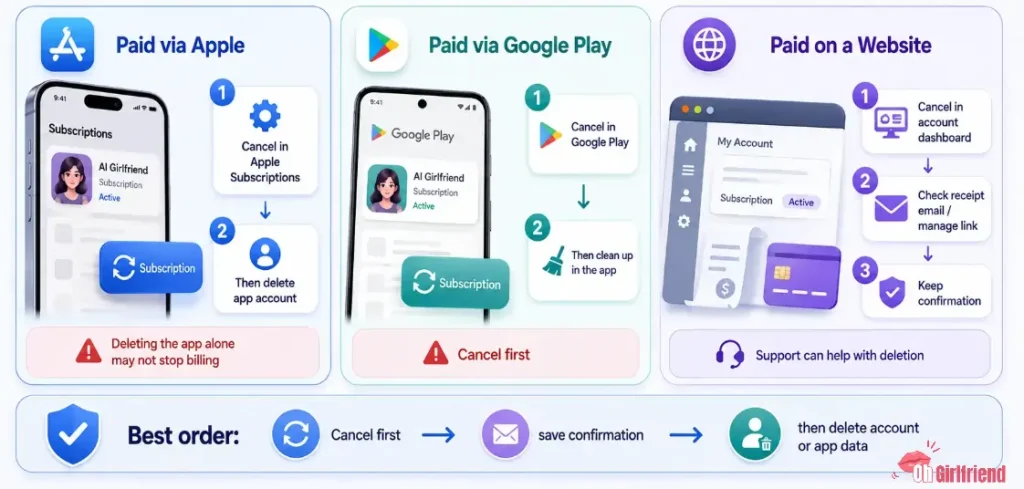
If you paid through Apple (App Store)
Your billing relationship is with Apple. That’s good news for cancellation control, but it also means:
If you paid through Google Play
Same deal: manage cancellation in Google Play subscription settings. Then clean up inside the app.
If you paid on a website
Website checkouts often create:
Do cancellation first. Then delete chats/account. Then keep the cancellation confirmation.
🔐 Privacy + Safety Notes (Because Deleting Chats Isn’t the Whole Story)
If your reason for deleting is “I don’t want this to leak,” here’s the real-world threat model:
If you handle only #5 and ignore the rest… you did the hard part and skipped the easy wins.
Quick privacy upgrades I actually use
💰 Cost Notes (What You Might Still Be Charged For)
Even after you “delete,” a few cost traps can still exist:
If money is involved and you’re unsure, cancel first, screenshot receipts, then delete.

More From OhGirlfriend
🎯 Final Verdict
If your goal is “make it stop,” remember the order: cancel billing → delete chats / reset memory → request account deletion.
Do those three and you’ll cover 95% of the “I deleted it but I’m still anxious” situations.
And if you’re picking a new AI girlfriend app after this, prioritize one thing: adult account controls. Great roleplay is fun… but being able to clean up after yourself is hotter.

Lucas – your go-to wingman in the world of AI girlfriends and virtual flings. From testing voice moans and NSFW chatbots to rating roleplay realism and emotional depth, he’s tried everything so you don’t have to. Whether you’re chasing a cute cuddle bot or a full-on spicy fantasy AI, Lucas gives you the no-filter lowdown on who’s worth your time (and your late nights).
Affiliate Disclosure: This post may contain some affiliate links, which means we may receive a commission if you purchase something that we recommend at no additional cost for you (none whatsoever!)